CivicLink
Connecting citizens to the representative who can act. Fast.
- Role
- Design Engineer
- Timeline
- January 2026 – Present, originally conceived in 2017
- Status
- Shipped
- Live
- civic-link.app
Most people don't know who represents them beyond the President. Even if they find out, contacting the wrong one feels like shouting into the void. CivicLink starts with the issue a person cares about, shows them which of their three federal representatives it belongs to, and gets them to a sent message in under a minute.
The origin
In 2007, during a summer internship in Washington, D.C. with my congressional representative, I tracked constituent mail, emails, and calls by hand: paper logs, spreadsheets, no way to see patterns. Citizens on the other side had the mirror problem, no idea who represented them and no single place to find out.
In 2017, during my UX design bootcamp, I designed CivicLink as a prototype to close that gap. It stayed a sketch for years. Building it was still beyond me.
Over the past three years, I got back into coding, using AI as a learning partner, and finally built what I'd only designed on paper. The build surfaced a harder problem than the one I started with.
The problem, twice
The obvious problem
Finding and contacting a representative means navigating separate government websites, each with its own format, with no consistency in what "contact" even means (email, web form, phone, mail).
The problem I found once I started building
Even when a tool solves that, it usually treats all three of a person's representatives as interchangeable. Enter an address, get three names, pick one to message. But a House member and two senators don't carry equal weight on every issue. Competitors like 5 Calls and Resistbot present them as if they do. That equivalence isn't just imprecise. It quietly reinforces the "it feels pointless" resignation my research turned up (more below): if the tool can't tell you who's positioned to act, why would you expect the representative to?
The pivot that shaped the product
My first answer to that problem was to map every issue to the specific committees that govern it, then branch the contact experience by role: chair, committee member, or general constituent. The message a user sent would reflect their rep's actual jurisdiction.
I built it, then pulled it back out. Committee assignments and bill stages change. A tool confidently telling someone "your rep chairs this committee" is worse than saying nothing if it's wrong, and keeping that claim accurate would have meant an ongoing maintenance commitment I wasn't ready to make well. I made the call to strip out committee mapping, bill tracking, and role-based branching entirely. That meant cutting the product's signature differentiator, mid-build.
What replaced it: issue-first still, with a direct ask. Every message template collapsed from three role-branched versions down to one honest "I'm asking you to..." per issue, and the explainer copy shifted from claims about a specific rep's committee seat to general, accurate civic education about how Congress works. The differentiation didn't disappear. Leading with the issue is still the whole premise. It just stopped overclaiming what the data supported.
This is now written into the project's product principles as a constraint for the current build: committee mapping, bill tracking, and role branching are explicitly out of scope, flagged so they don't quietly get reintroduced under time pressure before the accuracy problem is solved.
That's a pause. I'd like to bring committee-level targeting back eventually. The idea was right, the execution wasn't ready. The difference next time will be treating "is this claim still accurate" as an ongoing data problem to solve first, before anything gets built on top of it.
How it works
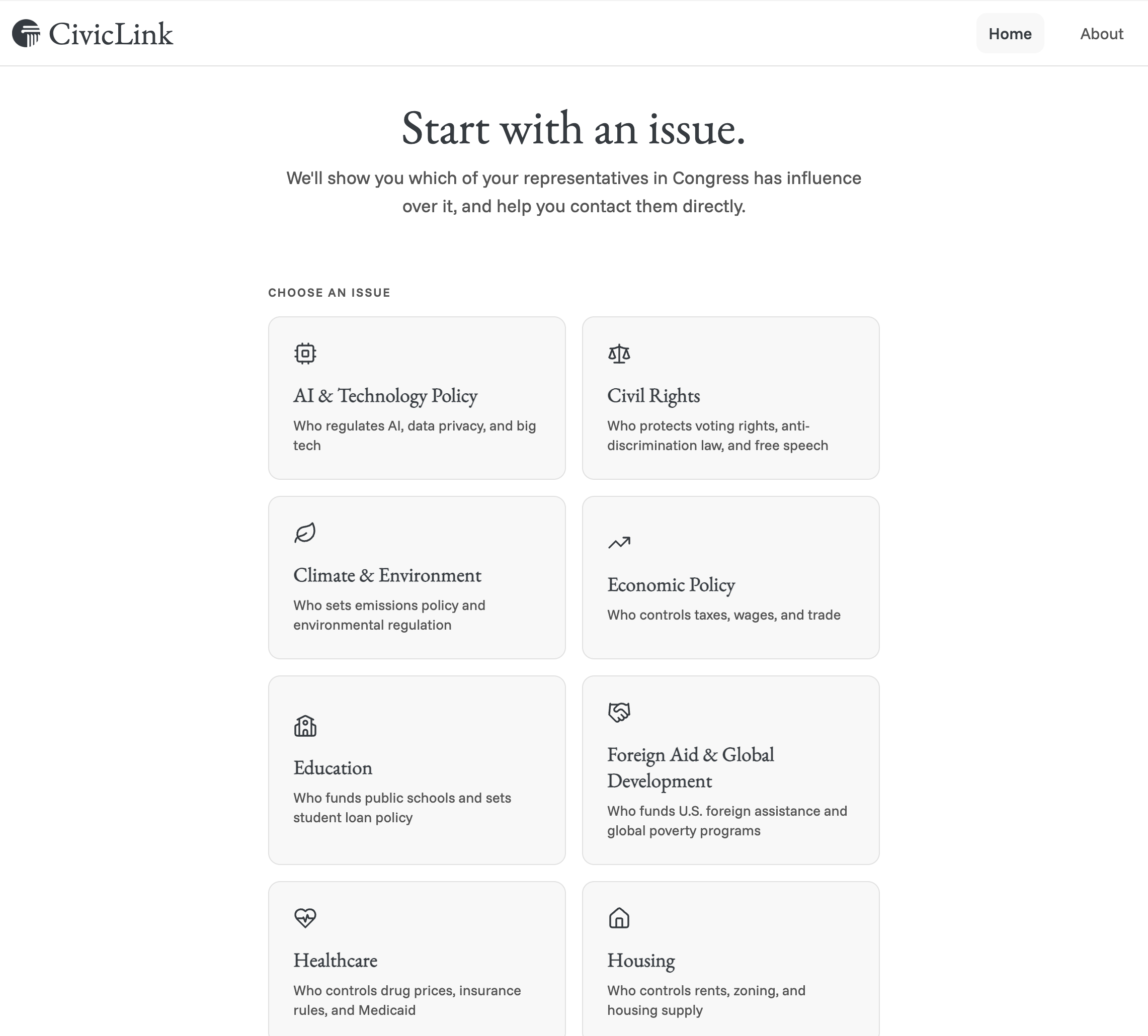
1. Choose your issue.
Housing, Climate & Environment, Healthcare, Immigration, Economic Policy, Civil Rights, Veterans, Education, Foreign Aid & Global Development. Pick what you care about.
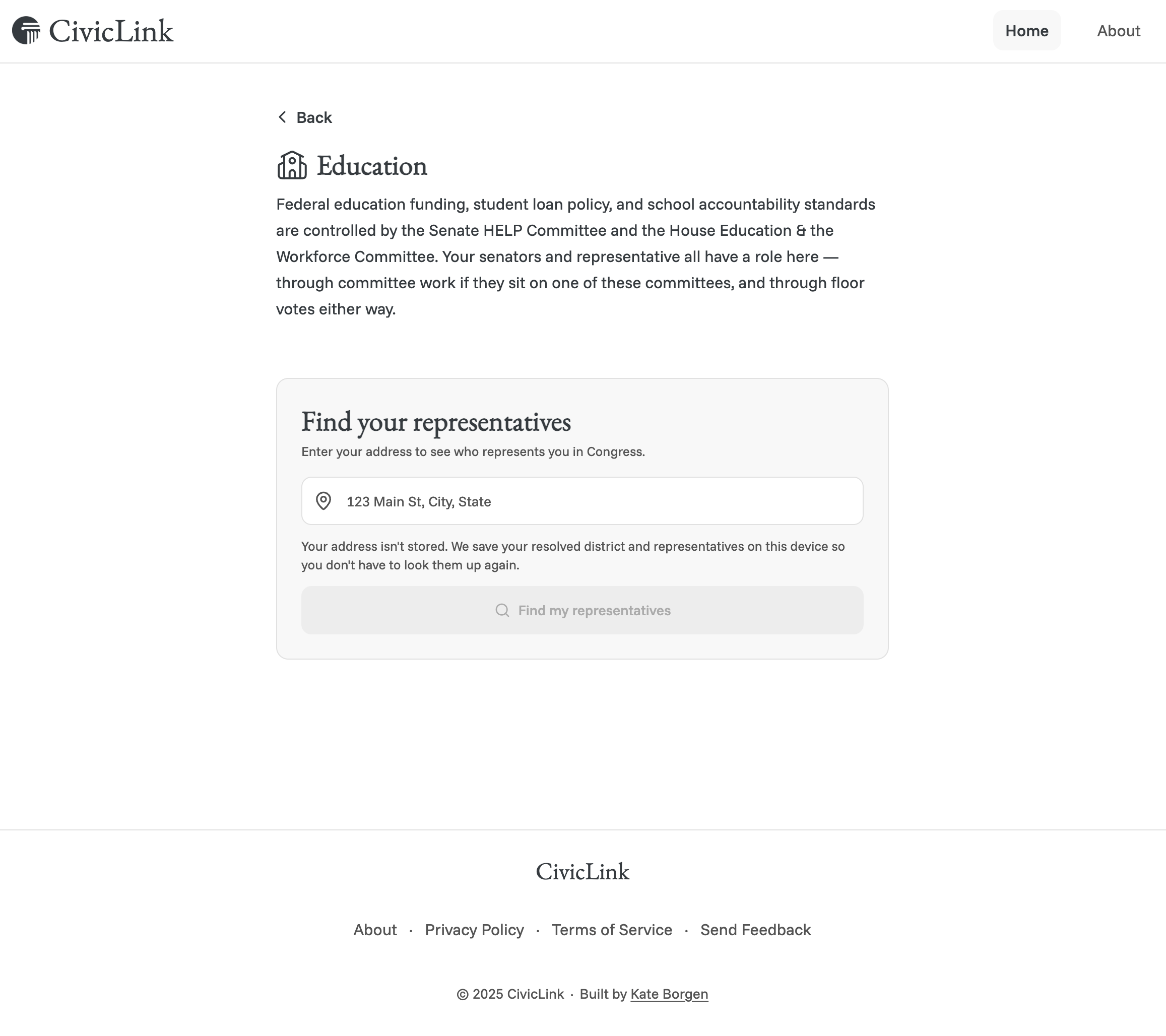
2. Understand who's positioned to help, then enter your address.
A plain-language explainer covers how Congress handles this issue: no unverifiable claims about a specific rep's committee seat, just accurate context at a 6th-8th grade reading level. From there, address resolves to your congressional district and your three federal representatives: two senators, one House member. Nothing else is stored. The raw address never persists. Only the resolved district and rep records stay, and only in your browser.
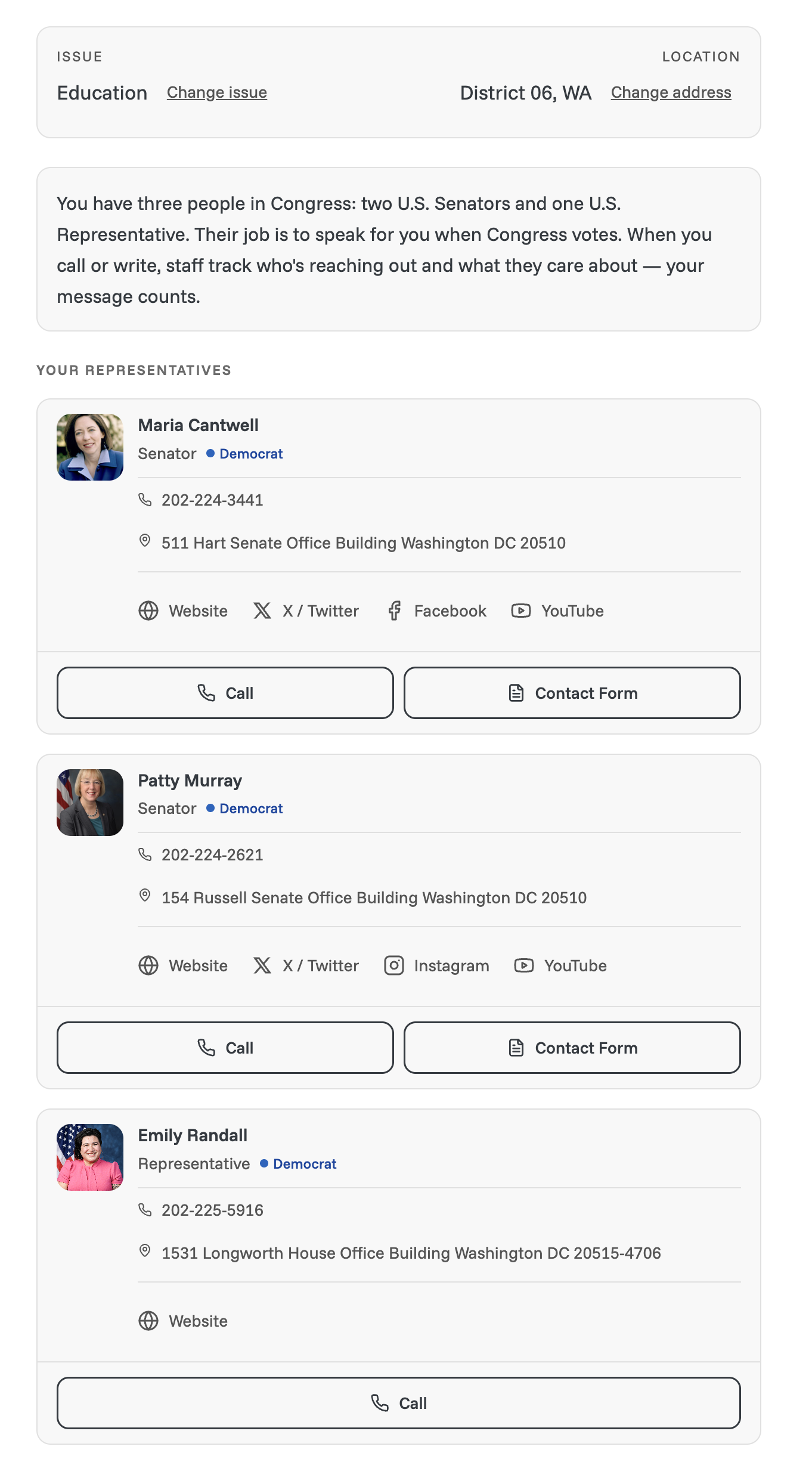
3. See your three representatives.
Each rep card leads with a short civic-education line, "your message counts," then shows call, contact-form, and social links, but only the ones that exist for that person. Missing channels are left off entirely.
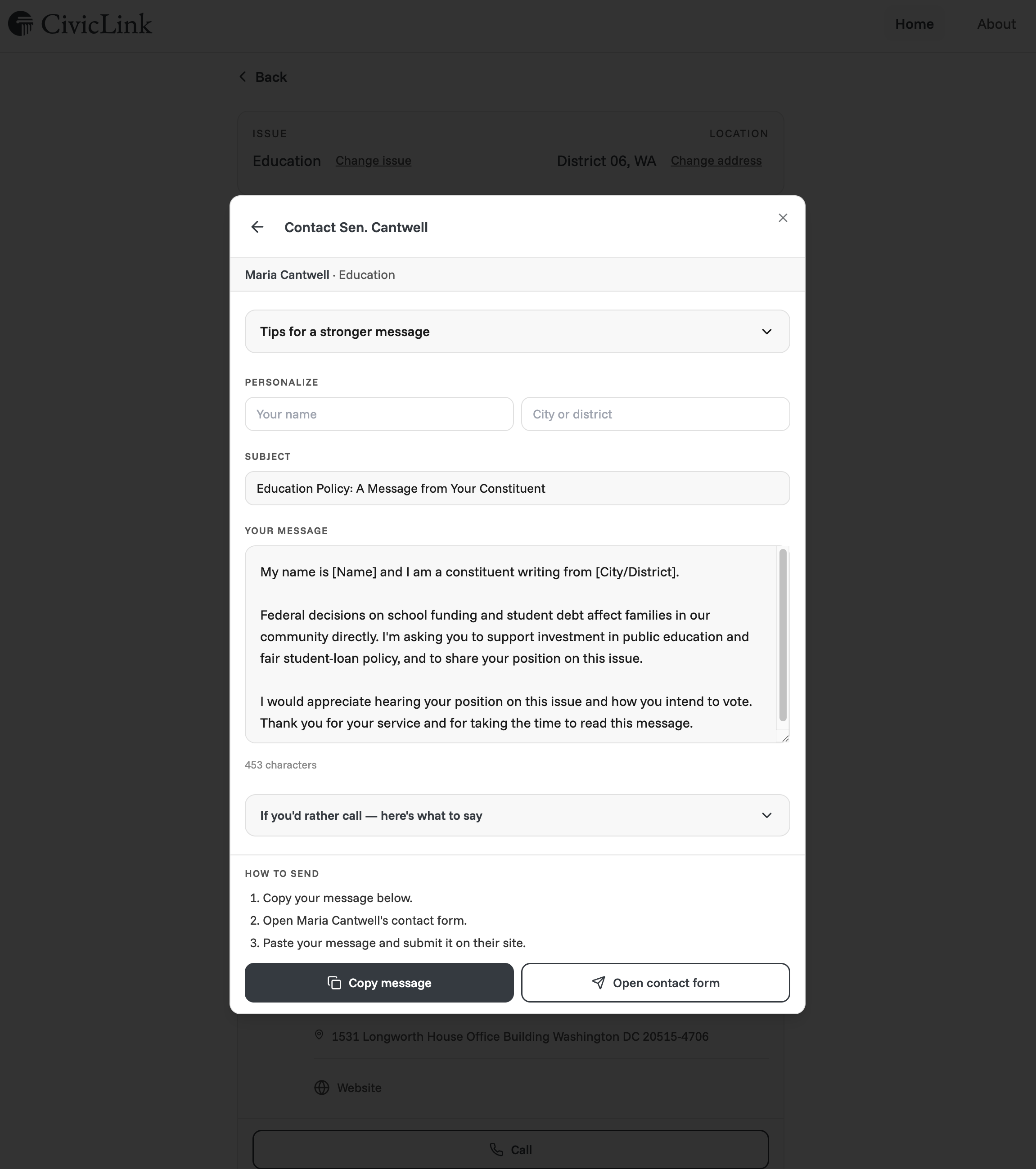
4. Send your message.
A ready-to-edit message is built from a shared opening/closing plus the issue's direct ask, with fields to personalize name and city. Contact happens through the representative's own web form. The "How to send" steps spell out that the user copies the message and pastes it into that form themselves. No one-tap send is implied.
Product principles that shaped every decision
- Federal-only. No state or local legislators. A narrower scope traded for higher confidence in what's shown.
- No accounts, stateless by design. Nothing about the user persists beyond their own browser. Nothing about them is sent anywhere.
- Web-form contact, stated plainly. Representative contact forms are the honest channel for message delivery. The UI states this directly.
- Omit missing channels. If a contact channel isn't available for a given rep, it's left off the card entirely.
- Universal design as the working method. Every screen is designed for the hardest case on each dimension: plain language, full VoiceOver support, 44x44pt tap targets, WCAG AA contrast, no account, slow connection. Everyone else is served for free by the same bar.
Research: what stops people
I ran a user survey (18 responses) to test my assumption about why people don't contact their representatives. I expected the barrier to be not knowing who to contact. It's part of it, but the largest single barrier, at 33.3%, was "it feels pointless," ahead of not knowing who to contact, not having time, or not knowing how.
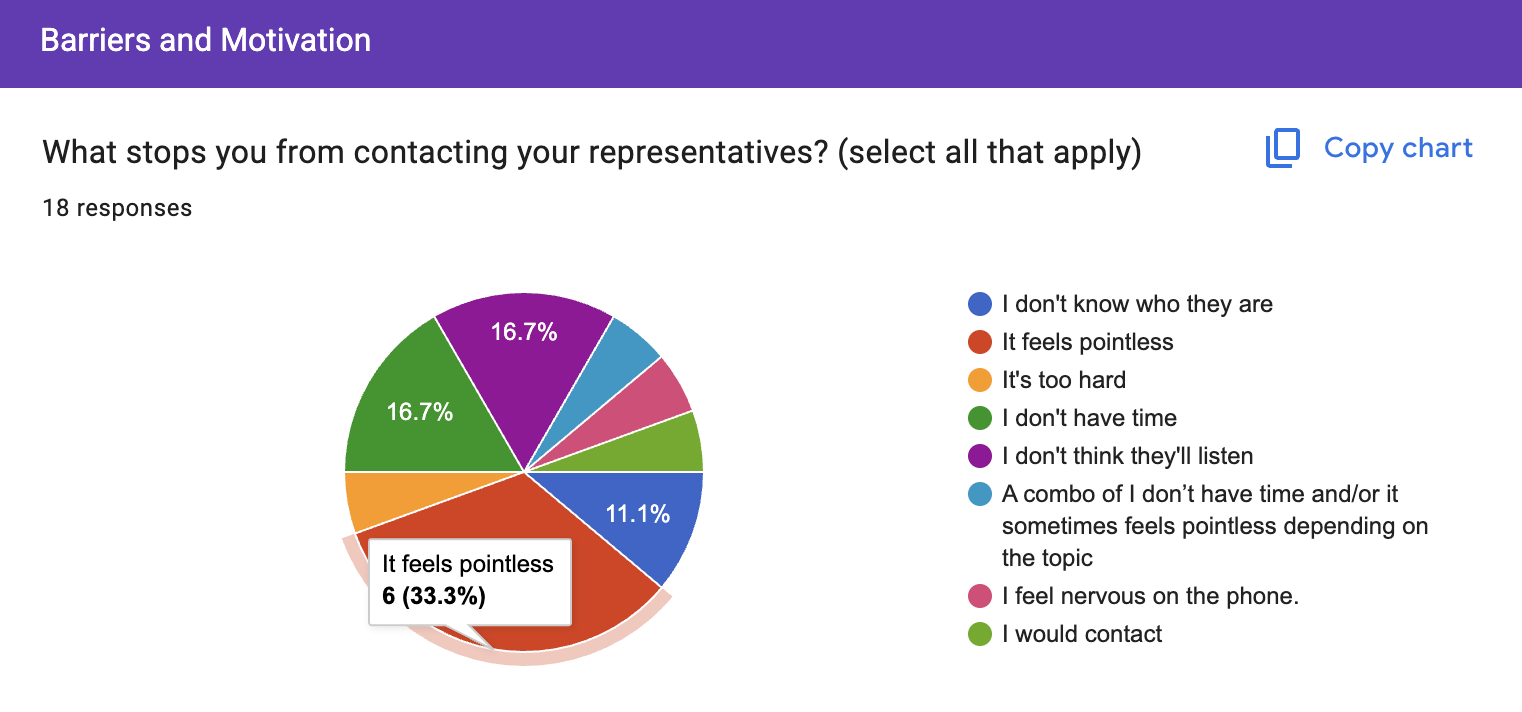
That reframed the design problem. UX can't manufacture belief that government responds. What it can do is shrink the distance between having an opinion and acting on it, so the resignation doesn't get the chance to set in before someone follows through.
Two user groups came out of the research:
First-time civic participants. Motivated by a specific issue, never contacted a representative before. The barrier is entirely upstream: not knowing who represents them or how to reach them.
Regular advocates. Already contact multiple representatives on recurring issues. The barrier is efficiency: repeating the same lookup and contact process every time an issue comes up.
Jordan, a first-time participant, is the person I designed for: cares enough about an issue to want to act, has never contacted a rep before, and isn't sure it would matter even if they figured out how. The goal for CivicLink is to get Jordan from motivation to a sent message in the same sitting the motivation exists, before it fades.
Process: scope discipline, twice over
The app's natural growth path included state legislators, bill tracking, committee-level branching, election calendars, and account-based history. None of it was needed to get someone from an issue to a sent message. I cut it twice. Once at the architecture level (state legislators, accounts, multi-tenant scaffolding). Again mid-build (committee mapping, once its real maintenance cost became clear). Every cut used the same filter: does this help this person contact the right representative today?
Conditional UI as a trust mechanic. A contact channel only renders if there's real data behind it. Showing a button that leads nowhere signals the whole system is guessing. Omitting it signals the data underneath is verified. That's a small interface decision doing real trust work.
Replacing discouragement with teaching. Early explainer copy read like a series of "no"s: you don't sit on this committee, this isn't the right rep for that. I rewrote every dead-end into either a direct ask or a plain-language teaching moment, on the principle that a civic tool should leave someone understanding the system better.
Degradation ladders. Anything dependent on outside data (social links, contact methods) needs a full fallback chain: live data, then cached, then fallback copy, then the module isn't shown at all. The bottom rung is a valid, intentional state. It doesn't behave like an error screen.
What I learned
This project started as a frustration I lived. The hours I spent on constituent data entry, time that should have gone to policy work, stuck with me for years before I had the skills to fix any part of it. I started building CivicLink last year, the first time the 2017 vision and the ability to build it met.
The research finding that mattered most wasn't the one I expected. I assumed the barrier was not knowing who to contact. The bigger one was resignation: "it feels pointless." No amount of better UX fixes that on its own. What UX can fix is the distance between having an opinion and acting on it.
The harder lesson came from cutting my own differentiator. Committee-level targeting was the thing that made CivicLink different from 5 Calls or Resistbot, and it was also the thing most likely to be quietly wrong in a way users couldn't detect. Scope discipline is easy to praise and hard to practice when the feature you're cutting is the one you built the pitch around. Doing it anyway, and writing down the plan to bring it back once the data problem is solved, is the part of this project I'd point to first.